

Mode 2 First: How New Pilots Test RC Transmitter Modes in a Simulator
Mode 2 is the right starting point for almost every new pilot, and the reason comes down to one stick. A “mode” simply describes which control stick moves throttle and which moves elevator; in Mode 2, throttle sits on the left stick and elevator on the right, matching what most simulators and FPV tutorials assume by default. This only applies to aircraft-style transmitters with two multi-axis sticks, not the wheel-and-trigger radios used for RC cars or boats.
TL;DR:
- Mode 2 is the default layout used by nearly all FPV and multirotor pilots worldwide because it aligns with full-size aircraft controls, making it easier to learn and find resources.
- Most transmitters allow mode switching via a menu, but older or budget models often require manual hardware modifications, such as swapping springs or gimbals, before changing modes.
- The four modes are mainly distinguished by which stick controls throttle, elevator, rudder, and aileron, with Mode 1 and Mode 4 being less common and often based on legacy or handedness preferences.
- Choosing a mode should depend on community standards, instructor habits, or simulator defaults, rather than ergonomic preferences, since all modes offer similar control performance.
- Spending time in a simulator before hardware purchase can help you determine which mode feels most intuitive for your flying style and handedness.
Table of Contents
- What Are RC Transmitter Modes, Exactly?
- What Is Mode 1 and Who Still Uses It?
- Why Is Mode 2 the Default for Most Pilots?
- What Is Mode 3 and Why Is It Rare?
- What Is Mode 4 and When Would You Choose It?
- How Do the Four Modes Compare Side by Side?
- How Should You Decide Which Mode to Learn?
- How Do You Change or Convert a Transmitter’s Mode?
- Where Can You Learn More Before Switching Hardware?
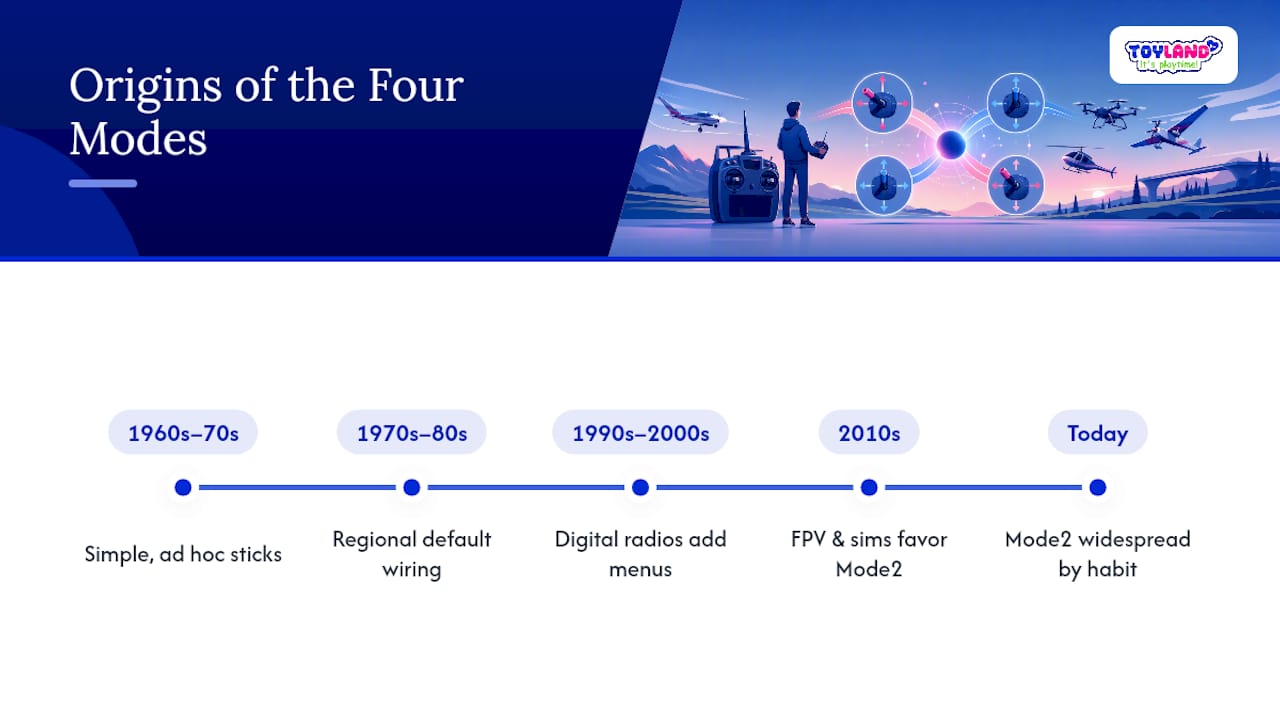
- Where Did These Four Modes Actually Come From?
- What Do the Four Stick Layouts Actually Look Like?
- What Beginners Get Wrong About Choosing a Mode
- Ready to Practice Your Stick Skills?
- Sources
- FAQ
What Are RC Transmitter Modes, Exactly?
A transmitter mode is a stick assignment layout, nothing more mysterious than that. Every stick radio has two gimbals, each capable of moving up/down and left/right, and a mode simply decides which physical motion controls throttle, elevator, aileron, and rudder.
This concept only exists on 4+ channel stick transmitters built for planes, helicopters, and multirotors. A basic RC car controller with a steering wheel and a trigger doesn’t need a “mode” because each control already has one dedicated job. The transmitter sends a digital signal to a receiver, which then drives servos, electronic speed controllers, and flight controllers based on that stick input, and stick radios exist specifically because aircraft need simultaneous, independent control over four axes at once.
There are four recognized modes, numbered 1 through 4, and they’re really two mirrored pairs. Mode 3 mirrors Mode 2. Mode 4 mirrors Mode 1. Once you understand two of them, you understand all four.
What Is Mode 1 and Who Still Uses It?
Mode 1 puts elevator and rudder on the left stick, and throttle and aileron on the right stick. Specifically:
- Left stick: elevator (vertical movement) and rudder (horizontal movement)
- Right stick: throttle (vertical movement) and aileron (horizontal movement)
This layout has deep roots in Australia and parts of Europe, and a segment of fixed-wing aerobatic pilots still prefer it because it keeps elevator and throttle on separate hands. That separation can help with certain precision maneuvers where you want fine pitch control independent of power changes.
The tradeoff shows up the moment you go looking for help online. Most tutorials, most simulator defaults, and most FPV content in 2026 assume Mode 2, so a Mode 1 flier has to mentally translate every instructional video. It’s not a dealbreaker, but it’s friction you don’t need as a beginner.
Why Is Mode 2 the Default for Most Pilots?
Mode 2 puts throttle and rudder on the left stick, elevator and aileron on the right:
- Left stick: throttle (vertical movement) and rudder (horizontal movement)
- Right stick: elevator (vertical movement) and aileron (horizontal movement)
The logic mirrors full-size aircraft, where your right-hand handles pitch and roll while your left hand manages power. That same logic carried over into FPV drone flying and flight simulator defaults, which is why nearly every tutorial, YouTube walkthrough, and training program built in the past decade assumes you’re flying Mode 2.
Mode 2 dominates worldwide adoption today, especially among multirotor and FPV pilots in the United States, according to RC Hobby Tips. That single fact is why most instructors default to teaching it.
One quirk worth knowing before you touch a transmitter: the throttle stick in Mode 2 usually has no centering spring, so it stays wherever you leave it instead of snapping back to the middle. That’s a deliberate design choice, not a defect, and it matters a lot if you ever switch modes later, because the spring behavior physically moves to a different stick.
What Is Mode 3 and Why Is It Rare?
Mode 3 is the mirror image of Mode 2. Where Mode 2 places throttle and rudder on the left stick, Mode 3 flips that to the right:
- Left stick: elevator and aileron
- Right stick: throttle and rudder
Almost nobody teaches Mode 3 as a default, and the pilots who fly it usually do so for personal handedness reasons or because they learned on an older radio configured that way. If you’re shopping for a used transmitter, seller listings rarely mention Mode 3 explicitly, so it’s worth asking directly rather than assuming.
Switching into Mode 3 on a modern radio is often a menu setting, but on older or budget models it may still require a physical spring or gimbal swap, same as converting between Mode 1 and Mode 2.
What Is Mode 4 and When Would You Choose It?
Mode 4 mirrors Mode 1, swapping which stick carries elevator and which carries throttle:
- Left stick: throttle and aileron
- Right stick: elevator and rudder
Mode 4 sits at the bottom of the popularity list by a wide margin. Pilots who choose it are almost always working around a specific handedness preference, or they trained on a Mode 1 radio decades ago and adapted the throttle side rather than relearn everything. Compatibility with current simulators and mid-range transmitters is generally fine since most software offers all four modes in the settings menu, but budget hardware sometimes locks you into whatever mode it shipped with.
How Do the Four Modes Compare Side by Side?
Familiarity, not performance, decides which mode is “better.” No mode gives you faster reflexes or more precise control on its own; the differences are entirely about muscle memory and what your community, instructor, or software already expects.
For a quick read on the recommendation: a beginner with no prior habits should learn Mode 2. An FPV pilot should learn Mode 2 without hesitation, since that’s what every drone tutorial assumes. A fixed-wing aerobatic pilot with a background in Mode 1 has a legitimate reason to stick with it. A left-handed pilot with no strong opinion either way can try Mode 1 or Mode 3 in a simulator before deciding, but there’s no evidence either helps left-handed control more than Mode 2 does.
How Should You Decide Which Mode to Learn?
Work through this before you commit money or muscle memory to a mode:
- Check what your instructor or local club flies. If you’re learning from a person rather than a video, match their mode. Fighting your teacher’s stick habits on top of learning to fly is unnecessary difficulty.
- Assume Mode 2 unless you have a specific reason not to. It aligns with the most tutorials, the most simulator defaults, and the most FPV content available.
- Weigh any legacy habit or handedness concern honestly. If you’ve flown Mode 1 for years on other radios, there’s a real cost to switching, and it might not be worth it.
- Spend real time in a simulator before buying hardware. RealFlight and similar programs default to Mode 2 but let you switch freely, so you can feel the difference for a few hours at zero risk.
- Confirm your transmitter supports the mode you want. Some radios switch modes through a menu; others need a physical gimbal or spring swap, so check before you buy.
Pro Tip: Before ruling a mode in or out, sit with both hands on the sticks and imagine flying a figure eight while adjusting altitude. Whichever mapping feels less like translation, not just less awkward, is usually the one that will stick.
How Do You Change or Convert a Transmitter’s Mode?
Most modern transmitters let you change modes through a settings menu, model by model, so switching one aircraft’s profile doesn’t affect the others stored on the same radio. After any software change, test on the bench before you fly. Move each stick slowly and confirm throttle, elevator, aileron, and rudder respond the way you expect.
Older or budget-tier radios often need a physical conversion instead. That usually means swapping the throttle stick’s ratchet mechanism for a spring, or vice versa, sometimes alongside a full gimbal swap, and major radio brands publish conversion kits and service manuals for exactly this job. Brands like Spektrum, Futaba, and FrSky commonly support this kind of conversion on their mid-range and higher transmitters.
Before your first flight after any mode change, confirm the following:
- Center both sticks and let go. Whichever one stays put, rather than springing back to center, is your throttle stick in the new mode.
- Rebind the transmitter to the receiver and verify the failsafe setting still triggers correctly.
- Ground-test the throttle at low power first, since a mislabeled channel can cause an unexpected motor spin.
Pro Tip: Never test a freshly converted radio with a propeller attached. Confirm every channel on the bench first, propeller off, before you risk your fingers on a mixed-up throttle assignment.
Where Can You Learn More Before Switching Hardware?
Getting this decision right matters more before you buy than after, which is why Thane Holland and the Toylandeu™ team put together the RC Toy Buying Guide 2025 as a companion resource for anyone shopping for a first radio or aircraft. It covers the terminology around RTR, ARF, and TX/RX setups that trips up a lot of new buyers.
If you’ve already got a transmitter and want to understand signal behavior once you’re in the air, the RC range guide breaks down what affects control distance and reliability. And for hands-on practice with either stick layout, Flightschoolusa is worth reading before your first RealFlight session. Major hobby authorities like the AMA back up the safety fundamentals referenced throughout this guide, and that’s the kind of grounding worth trusting over guesswork.
Where Did These Four Modes Actually Come From?
The mode system wasn’t designed top down. It grew out of decades of pilots adapting single-stick and dual-stick transmitter hardware to match how full-size aircraft cockpits felt, long before anyone standardized a naming convention.
Early RC transmitters in the 1960s and 1970s often used simpler stick arrangements borrowed directly from whatever felt natural to the hobbyists building them. As dual-stick, four-channel radios became common through the 1970s and 1980s, manufacturers in different regions settled on different default wiring for throttle and elevator, largely based on local instructor habits and which full-scale flying conventions were dominant nearby. That’s a big part of why Mode 1 took hold strongly in Australia and pockets of Europe while American and broader international markets gravitated toward what we now call Mode 2.
Modes 3 and 4 never had strong regional footholds. They emerged mostly as the logical mirror images of the two dominant layouts, useful mainly for pilots with specific handedness needs or people converting old habits from one dominant hand to the other. As digital and computerized transmitters replaced purely mechanical ones through the 1990s and 2000s, switching between all four modes became a menu option on higher-end radios instead of a hardware modification. The rise of FPV drone racing and multirotor simulators in the 2010s cemented Mode 2 further, since nearly every training platform and online tutorial simply built around it by default. The result is a hobby where history, not engineering, decided which stick does what.
What Do the Four Stick Layouts Actually Look Like?
Picture a transmitter face down on a table, two sticks visible, left and right. Each stick moves two ways: up and down, and side to side. That gives you four possible motions total, and each mode assigns throttle, elevator, aileron, and rudder to those four motions differently.
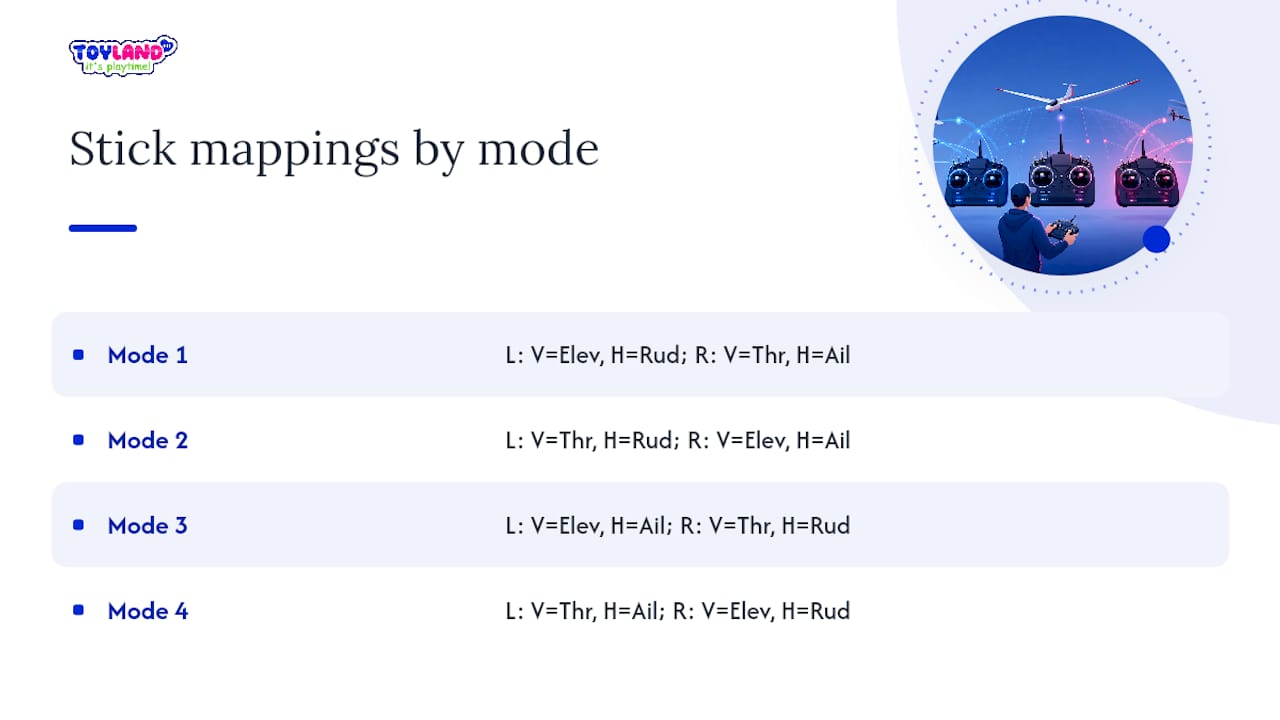
In Mode 1, picture the left stick moving up and down for elevator, and side to side for rudder. The right stick moves up and down for throttle, side to side for aileron. Visually, the “flight controls” (elevator and aileron) end up split diagonally, elevator on the left’s vertical axis and aileron on the right’s horizontal axis.
In Mode 2, that split flips. The left stick’s vertical motion is throttle, its horizontal motion is rudder. The right stick’s vertical motion is elevator, and its horizontal motion is aileron. Both flight-critical controls (elevator and aileron) sit together on the right stick, which is part of why many pilots describe Mode 2 as feeling more like “one stick flies the plane, one stick manages power.”
Mode 3 takes the Mode 2 assignment and mirrors it left to right: throttle and rudder move to the right stick, elevator and aileron move to the left. Mode 4 does the same mirroring to Mode 1’s layout. If you ever get confused reading a diagram, the fastest check is the one mentioned earlier: center both sticks and release them. The stick that doesn’t spring back to center is always your throttle stick, regardless of which mode you’re labeled as flying.
What Beginners Get Wrong About Choosing a Mode
Most advice on this topic treats mode selection like a personality quiz, as if your handedness or your “flying style” should dictate the answer. It shouldn’t, and the data backs that up: Mode 2’s dominance isn’t about ergonomics, it’s about network effects. Tutorials, simulator defaults, and FPV communities all standardized around it, so learning it means every resource you’ll ever touch already assumes your stick layout.
The bigger mistake I see is skipping the simulator step entirely. Pilots commit to a physical radio’s mode before they’ve spent even an hour feeling the difference, then discover months later that switching means relearning muscle memory from zero. A few hours in RealFlight costs nothing and tells you more than any article, including this one, ever could.
If there’s one place conventional advice falls short, it’s underselling how much friction Mode 1 or Mode 3 create later, not immediately. You’ll fly fine either way at first. The pain shows up the first time you try to follow a tutorial, join a club, or lend your transmitter to a friend who learned differently. Prioritize compatibility with the ecosystem you’ll actually use, not a theoretical ergonomic edge that the evidence doesn’t really support.
— Thane Holland
Ready to Practice Your Stick Skills?
Reading about stick mapping only gets you so far. At some point you need a transmitter in your hands and something in the air, and that’s where Toylandeu™ comes in.

Toylandeu™ offers ready-to-fly aircraft suitable for hands-on practice, including options like the RC app-controlled Boeing 787 glider for pilots who want to experience different throttle layouts without committing to an expensive setup. The platform provides a wide range of products including beginner-friendly RC planes and stunt cars to help build stick confidence before progressing to full four-channel flying. For those deciding between hardware options, consider products like the RC gesture-controlled stunt car to build basic control skills before moving on to stick-based aircraft radios. Pick your first trainer today and start practicing the mode you’ve decided fits you best.
Sources
- RC Transmitter Modes for Airplanes
- RC Transmitter Mode 1 vs Mode 2 — Which Should You Use
- Radio Programming Basics — AMA Flight School
- RC Radio Systems Explained: The 2026 Guide for RC Boats, Planes, and Cars
- FPVcraft — RC transmitter mode 1/2/3/4
FAQ
What is Mode 1 and Mode 2 in RC?
Mode 1 puts elevator and rudder on the left stick and throttle and aileron on the right. Mode 2 flips throttle and rudder to the left stick and puts elevator and aileron on the right, making it the more widely taught layout today.
What is Mode 2 on an RC transmitter?
Mode 2 is the stick layout where the left stick controls throttle (up/down) and rudder (left/right), while the right stick controls elevator (up/down) and aileron (left/right). It’s the default assumed by most simulators, FPV tutorials, and modern flight training programs.
What are the channels on an RC transmitter?
Channels are the individual control signals a transmitter sends, typically throttle, elevator, aileron, and rudder as the core four, with additional channels available for flaps, retracts, or auxiliary functions on more advanced radios. Transmitter modes only matter on radios with four or more channels arranged across two multi-axis sticks.
What are the three types of transmitters?
RC transmitters generally fall into three categories: stick-based radios for aircraft and multirotors (which use the mode system), wheel-and-trigger radios for cars and boats, and simplified single-stick or app-based controllers for basic toy-grade vehicles. Only the first category involves choosing between Modes 1 through 4.
How do I change my transmitter’s mode?
On most modern radios, you switch modes through a settings menu without opening the case, though some older or budget models require swapping a physical throttle spring or ratchet mechanism. Always bind, check failsafe, and ground-test the throttle before flying after any mode change.